Resume Arena
Independent directory of resume builders, ATS scanners, and templates
Jobscan
ATS Resume Scanner & Builder
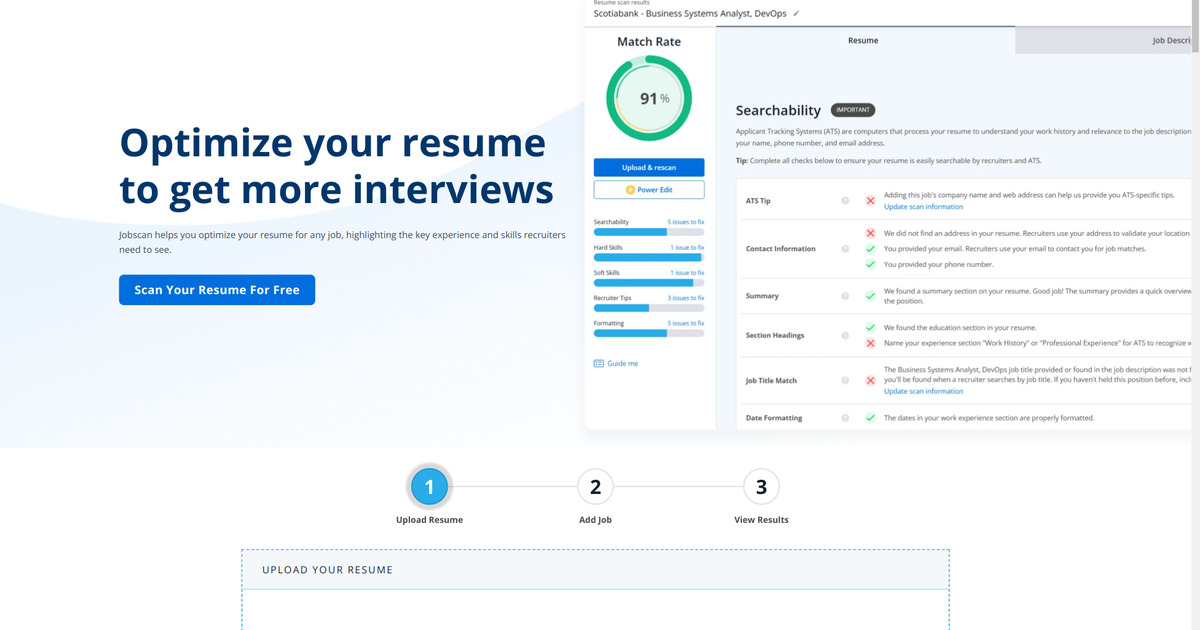
Jobscan reverse-engineers top ATS algorithms, highlights missing keywords, and provides a builder, LinkedIn optimizer, and cover-letter scanner to increase interview chances.
Features
- ATS resume scanner
- Keyword match report
- Resume builder
- LinkedIn optimizer
Pricing
Starting from Free
5 scans free; Premium $49.95/mo or $89.95/quarter
Last updated: May 2026
Jobscan Review
Jobscan is an ATS optimization tool, not a traditional resume builder. You paste your resume and a job description, and it tells you what to fix — missing keywords, formatting issues, match rate. That narrow focus is its strength: no other tool we tested does ATS scoring as well.
Most job seekers use Jobscan alongside a separate resume builder. Build the resume in something like Enhancv or Zety, then run the finished PDF through Jobscan before submitting. That two-step workflow covers both presentation and keyword optimization.
Pricing
| Plan | Price | What you get |
|---|---|---|
| Free | $0 | 5 scans every 30 days |
| Premium monthly | $49.95/mo | Unlimited scans, score history, LinkedIn optimizer, cover letter checker |
| Premium quarterly | $89.95/quarter (~$30/mo) | Same as monthly, lower price |
The free tier is enough to test the workflow on a few applications. If you’re tailoring resumes for many roles at once, you’ll burn through 5 credits fast — that’s where Premium earns its price.
Last verified: July 2025
What the Scanner Checks
Jobscan’s scanner compares your resume against a specific job description and flags:
- Missing keywords (hard skills, soft skills, job-specific terms)
- ATS formatting problems (bad headings, non-standard sections, problematic layouts)
- Job title and experience alignment
- An overall match-rate score
It does not generate content for you. It tells you what’s missing so you can fix it yourself.
Is Jobscan Worth Paying For?
It depends on how many applications you’re sending. If you apply to 2-3 jobs per month, the free tier covers it. If you’re in an active search and customizing your resume for each role, $49.95/month for unlimited scans pays for itself quickly — especially if weak keyword matching has been holding you back.
Jobscan is priced as a short-term tool. Subscribe during your job search, cancel when you land something. The quarterly plan ($89.95) makes more sense than monthly if your search runs longer than a few weeks.
Scanner vs Builder — Different Tools for Different Jobs
Jobscan has a built-in resume builder, but it’s basic — 9 templates, limited design options. The builder exists as a convenience, not a selling point. If presentation matters for your target roles, build the resume elsewhere and use Jobscan purely for the scan.
Alternatives
- Enhancv: Better for visual resume building and deep customization. No ATS scanning — pair with Jobscan if needed.
- Zety: Better for guided writing and fast drafts. Includes a basic resume checker, but not as thorough as Jobscan’s scanner.
- Teal: Offers a free builder with built-in keyword matching. Less precise than Jobscan’s scanning, but covers more of the workflow in one tool.
Criteria Ratings
1. Core Functionality
AI Capabilities and Content Generation: 4.5/5 Analyzes job descriptions and suggests keywords, but doesn’t auto-write content. More analytical than generative.
ATS Compatibility and Optimization: 5/5 The core product. Scans against real ATS algorithms, flags formatting issues, and provides actionable match-rate reports. Users report significant improvements in callback rates after optimizing.
Template Quality and Design Options: 3.5/5 9 clean, ATS-compatible templates. Functional but limited. Not competitive with design-focused builders.
Customization and Flexibility: 4/5 Iterate based on scan feedback, adjust sections, sync with LinkedIn. Optimization-oriented rather than drag-and-drop creative.
2. Usability
Ease of Use and Interface: 4.5/5 Paste resume, paste job description, click scan. Results are clear and actionable. A 5-minute workflow.
Mobile Compatibility: 4/5 Works on mobile browsers. No dedicated app, but the scan workflow is simple enough on a phone.
3. Value and Pricing
Pricing Transparency and Affordability: 4/5 Clear tiers, no hidden fees. The free tier is genuinely useful. Premium is fair for active searches but expensive for casual use.
Overall Value for Money: 4.5/5 Strong ROI during an active job search. The free tier lets you validate the workflow before paying.
4. Additional Factors
Customer Support and Resources: 4/5 Chat and email support, plus an extensive blog covering ATS tips. No 24/7 availability.
Integration Capabilities: 4.5/5 LinkedIn optimizer, job board description imports, multiple export options.
Accuracy and Reliability: 5/5 Keyword matching is precise. ATS simulations produce consistent, actionable results.
Security and Privacy: 4/5 Data encryption, no long-term resume storage unless opted in. No reported incidents.
Overall Rating: 4.3/5
Recommended Workflow
Table of Contents
FAQs about Jobscan
- How much does Jobscan Premium cost per month?
- Jobscan Premium is $49.95 per month and unlocks unlimited ATS scans, score history, cover letter checks, and the resume builder. Quarterly and biannual bundles lower the monthly cost.
- Can I try the Jobscan ATS resume scanner for free?
- Yes. Every account receives 5 free scan credits per month so you can test the ATS resume scanner, compare keyword matches, and preview optimization tips before upgrading.
- How does Jobscan compare to other resume builders?
- Jobscan focuses on ATS analysis rather than visual design, so most job seekers pair it with a dedicated builder such as Enhancv, Zety, or Canva for formatting, then re-run Jobscan reports to confirm the keyword match score.
- Is Jobscan free?
- Jobscan has a free tier with 5 scan credits every 30 days. Paid plans unlock unlimited scans and extra optimization features.
- Does Jobscan help optimize a resume for ATS keywords?
- Yes. Jobscan compares your resume against a job description, highlights missing keywords and formatting issues, and suggests changes to improve ATS alignment.